Шэньчжэньская компания «Showin Stage Lighting»

Bidirectional ARTNET‑8DMX Converter, 8‑Port ArtNet DMX512 Lighting Network Node

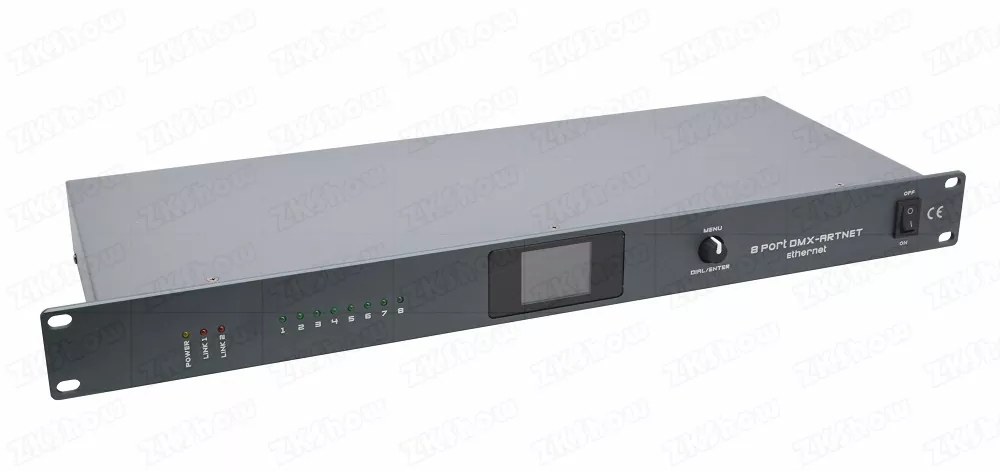
The bidirectional artnet‑8dmx converter is professional rack‑mount network node built for stage rental crews, lighting designers and event system integrators. When you run large‑scale live concerts, TV broadcast recordings, corporate award shows or permanent venue installations, stable lighting signal transmission is critical to show success. Traditional unidirectional ArtNet‑DMX hardware brings many field headaches: ground‑loop flicker, limited port function, single configuration method and poor scalability. This upgraded 8‑port artnet dmx512 converter solves these real‑world pain points. Every DMX port supports input, output or disable mode, with full‑port galvanic isolation, dual TFT‑web configuration and MA‑series console optimized network modes. One compact 1U unit delivers up to 4096 DMX channels for complex lighting system deployment. For more professional stage network accessories, check our ip65 8x60w pixel‑controlled moving head wash light.
Solve Common Field Pain Points With bidirectional artnet‑8dmx converter
Lighting technicians frequently meet avoidable signal failures caused by low‑grade network converters. Understanding these real‑world pain points helps you pick proper hardware for your rental fleet or fixed‑install projects.
Unidirectional Ports Waste Your Rack Space & Budget
Many budget artnet nodes only support ArtNet‑to‑DMX output. If you need to feed physical DMX signal back to lighting network, such as backup console merging or local DMX controller capture, you need to purchase separate encoder devices. It occupies extra rack units, adds more cables and creates extra failure points. Our bidirectional design allows each port to toggle input / output / disable without additional hardware.
Missing Galvanic Isolation Triggers Ground‑Loop Troubles
Ground loop interference is one top cause of random fixture flicker, mis‑behaviour and even hardware damage on multi‑power‑source venues. Cheap converters skip full port‑to‑port electrical isolation. Different ground potential across stage power phases leaks into signal lines and creates intermittent faults hard to diagnose during live performance. Rental companies suffer high repair cost after site damage. Full galvanic isolation of this bidirectional artnet‑8dmx converter blocks voltage spike and static interference.
Single‑Way Configuration Risks Show Delay
Most entry‑level converters only offer web‑browser configuration. If your laptop crashes or network parameters mismatch on site, you cannot adjust universe mapping or port direction. You get stuck before lighting programming starts. This professional node supplies both local TFT colour screen operation and remote web‑server access, guaranteeing system resilience under emergency site conditions.
Poor Scalability For Large‑Channel Productions
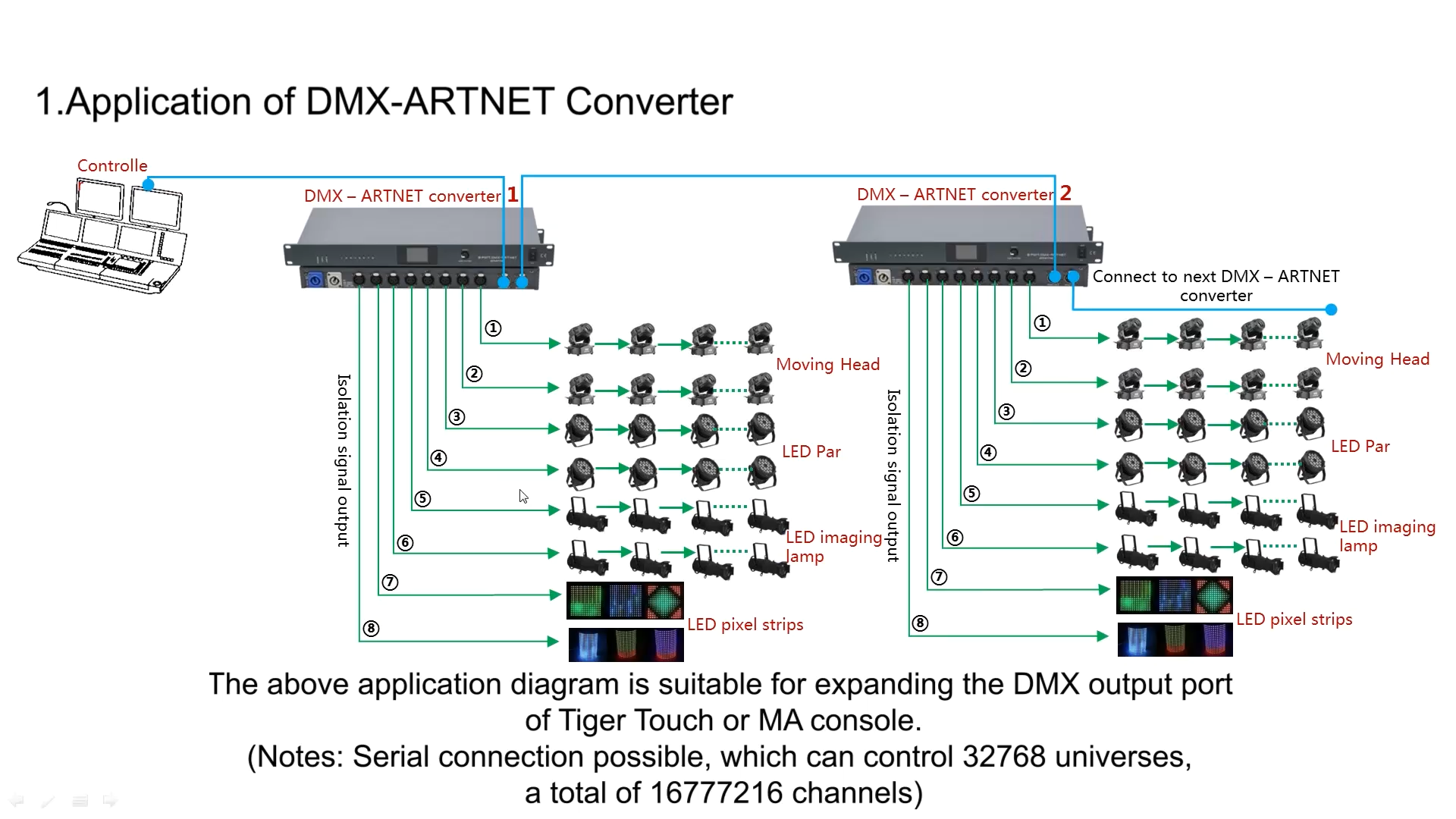
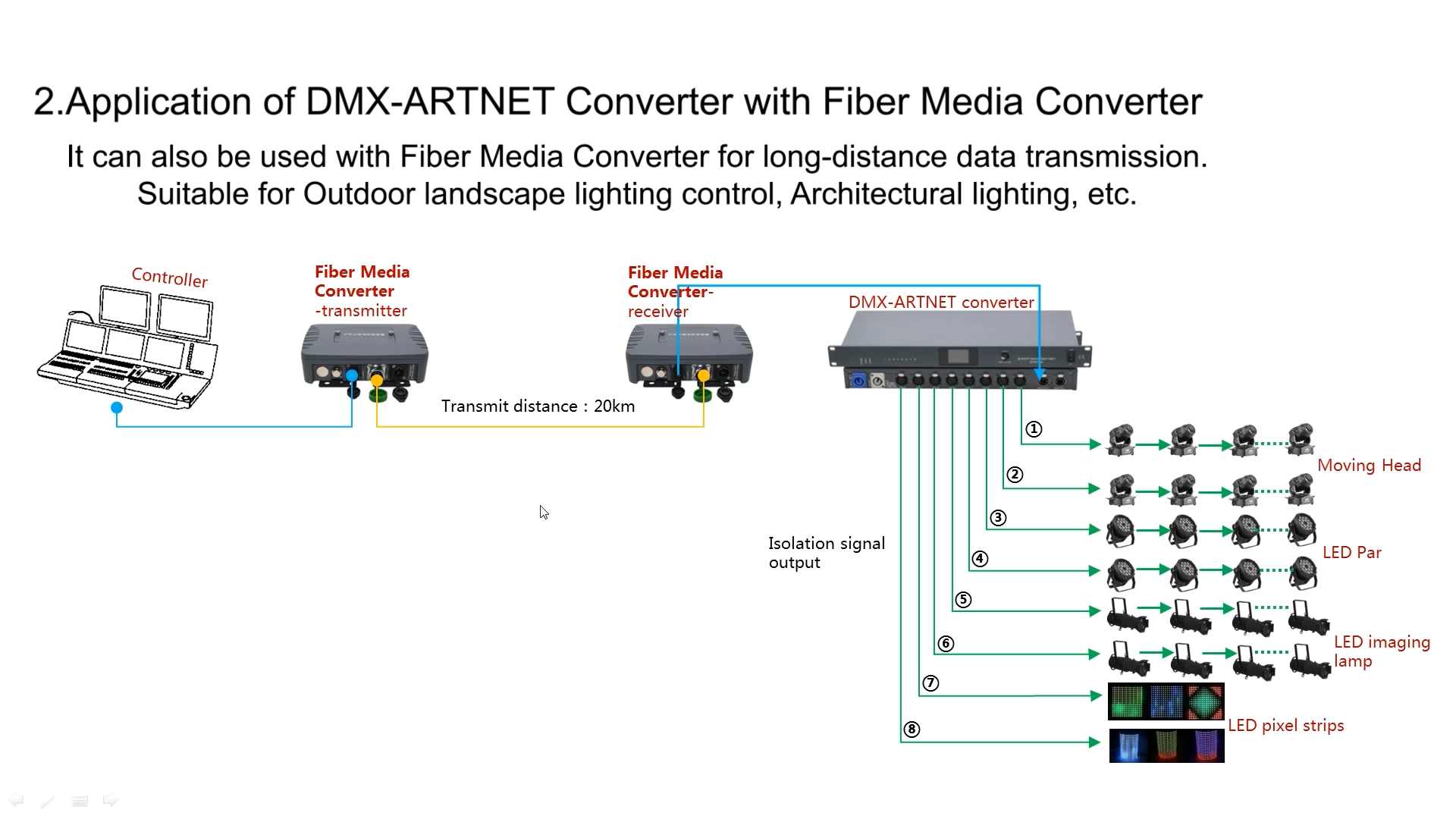
Traditional DMX daisy‑chain is limited by cable length and single‑universe restriction. Expanding channel capacity means stacking multiple small 2‑port or 4‑port nodes, resulting in messy rack layout, numerous power adapters and complex IP management. This 1U 8‑universe artnet node consolidates 8 DMX512 universes inside one rack unit, simplifying system expansion for festivals, theatre and broadcast projects.
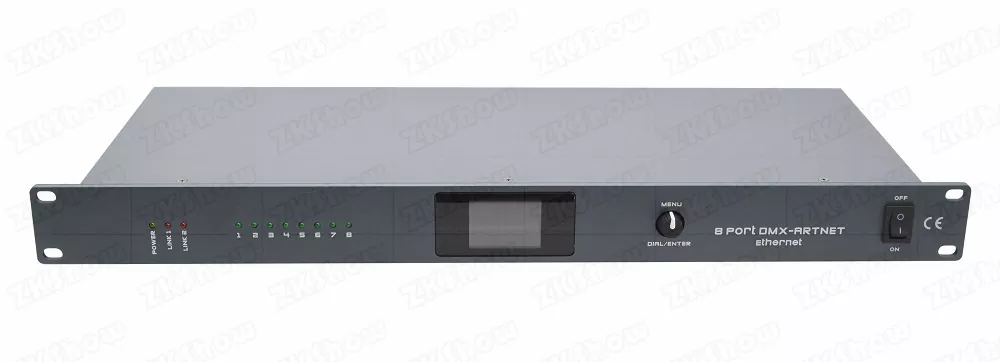
Core Hardware Selection Criteria for 8‑Port ArtNet DMX Node
When you compare different bidirectional artnet‑8dmx converter options, evaluate from touring‑rental and engineering perspective, not only marketing‑sheet parameters.
- Independent Bidirectional Ports + Full‑Port Galvanic Isolation: All eight DMX ports can switch input / output / disable separately. 100% electrical isolation between every I/O port suppress ground‑loop noise and protect converter and connected stage fixtures from venue‑side voltage spikes. Adopt genuine Neutrik 3‑pin XLR connectors to stand repeated rigging, de‑rigging and rough transport for rental inventory.
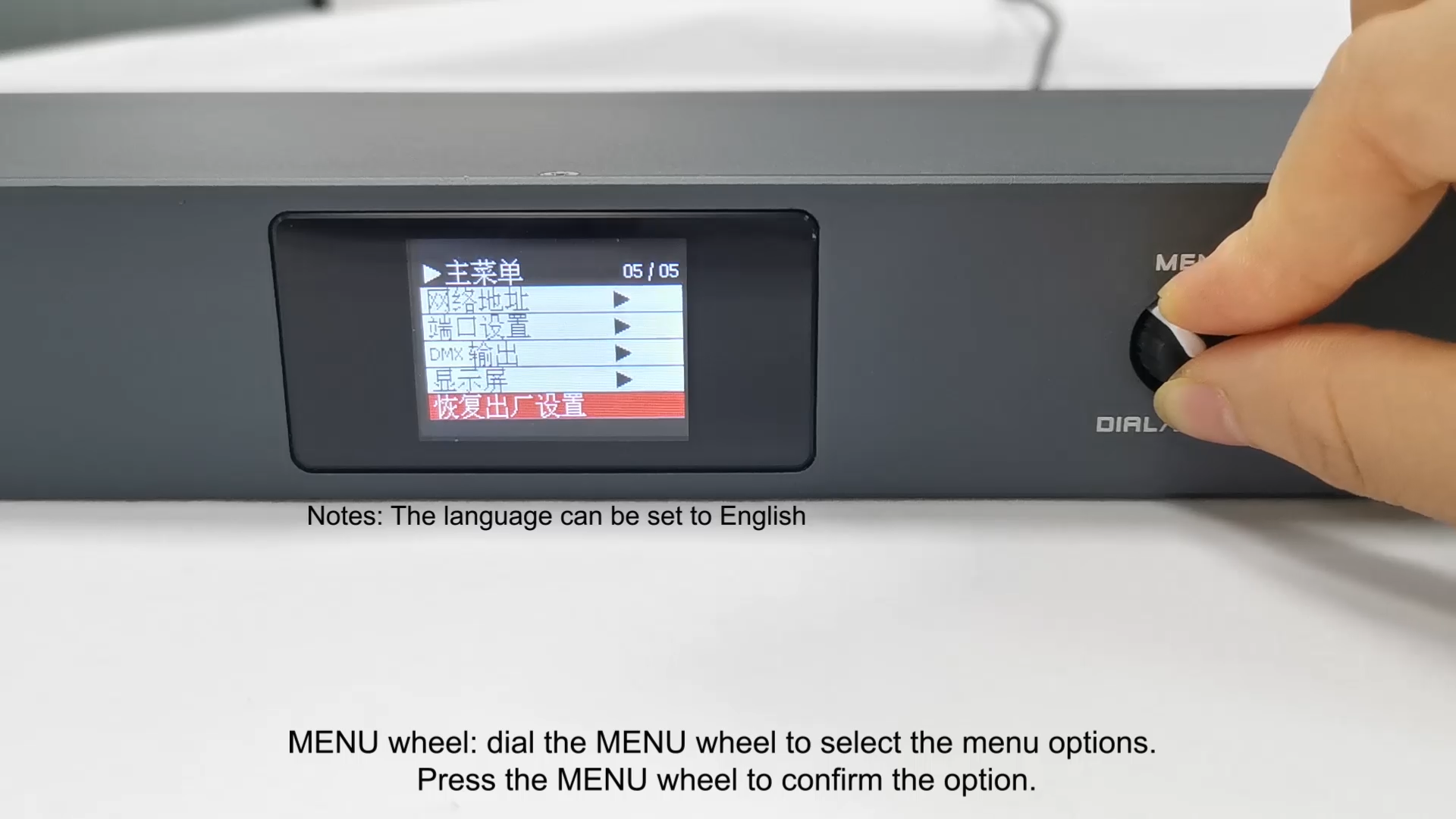
- Dual Configuration System: Local TFT Screen + Embedded Web Server: Operators adjust universe mapping, IP modes, port direction and factory reset via front‑panel TFT colour screen and rotary encoder without laptop. Port‑status LED indicators give instant visual feedback during rig‑check. Built‑in web server allows batch editing network parameters, DMX timing and admin password from any device inside same lighting subnet. Password protection prevents unintended modification by third‑party site staff.
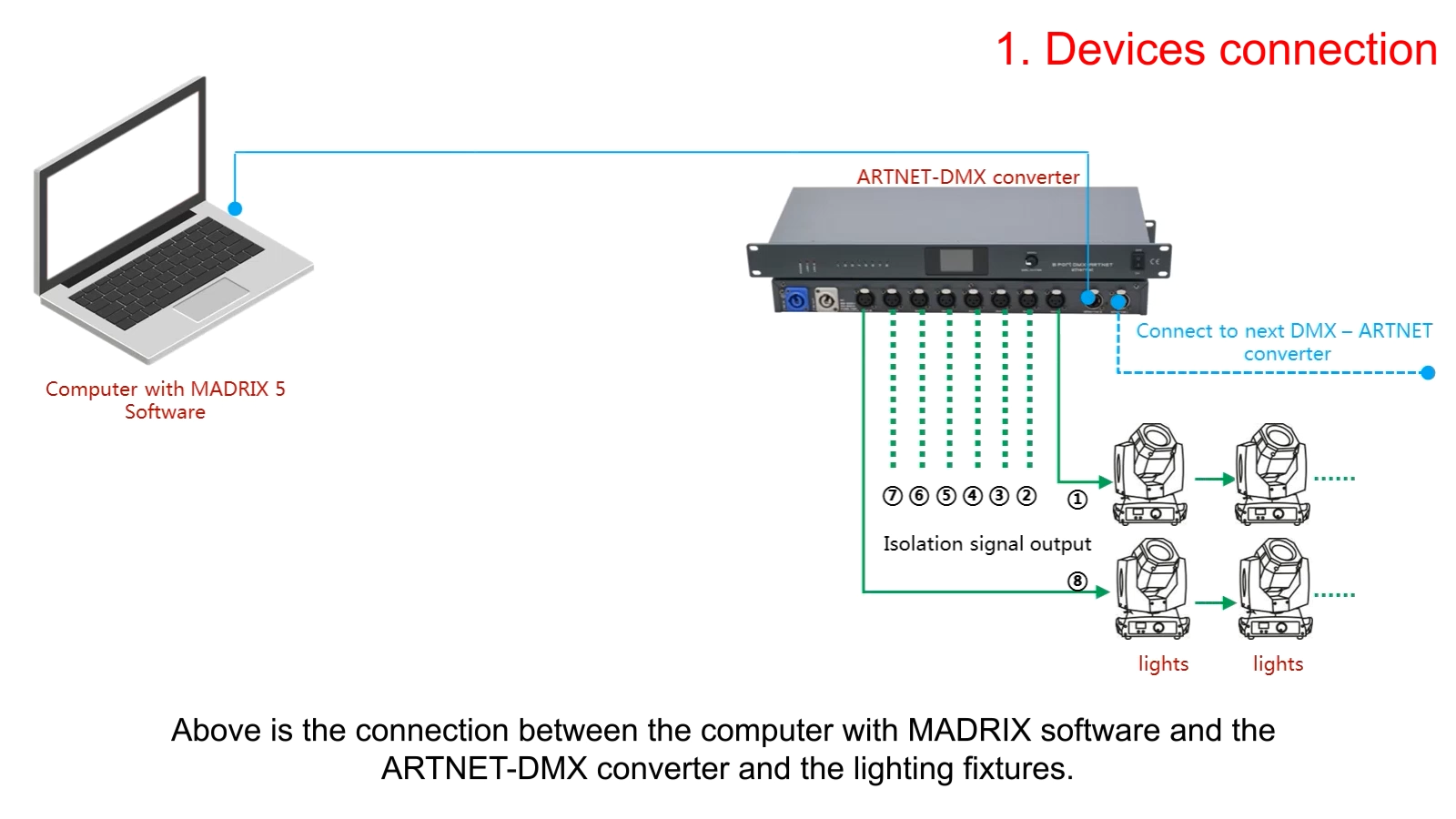
- Dual RJ45 Ethernet Ports & Standard 1U Rack‑Mount Form Factor: Dual network ports support internal‑switch hand‑in‑hand cascading. You can daisy‑chain multiple nodes without running every unit back to main lighting switch, cutting on‑site cabling workload. Standard 19‑inch 1U rack‑mount dimension fits flight‑cases and equipment racks for both touring and permanent installation. Wide‑range AC88‑256V universal power input adapts global mains voltage for international event touring.
- Strict Protocol Compliance & Adjustable Timing: Fully complies with official ArtNet and DMX512‑1990 standards. Supports complete ArtNet addressing scheme: network address 0‑127, subnet address 0‑15, universe assignment 0‑15 for each physical port. DMX‑Break and DMX‑MAB timing parameters are user‑adjustable, ensuring compatibility with legacy timing‑sensitive lighting fixtures. Multiple chained converters support total up to 32768 ArtNet universes for massive festival‑scale rigs.
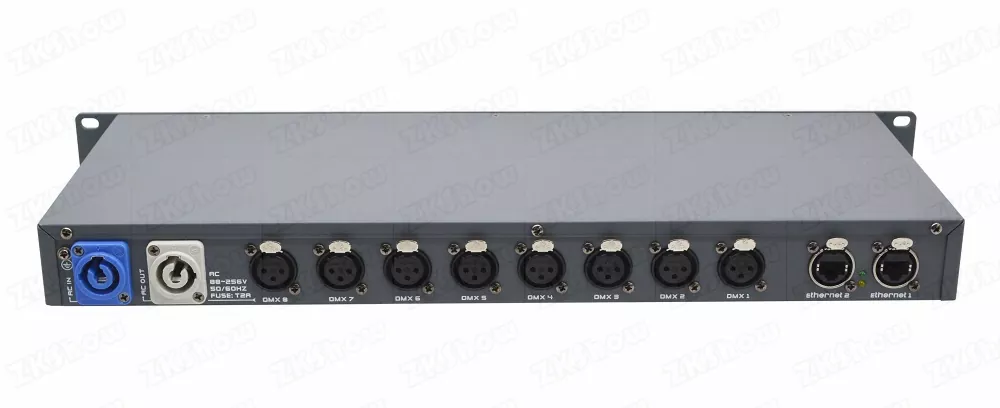
Working Modes & IP Configuration for bidirectional artnet‑8dmx converter
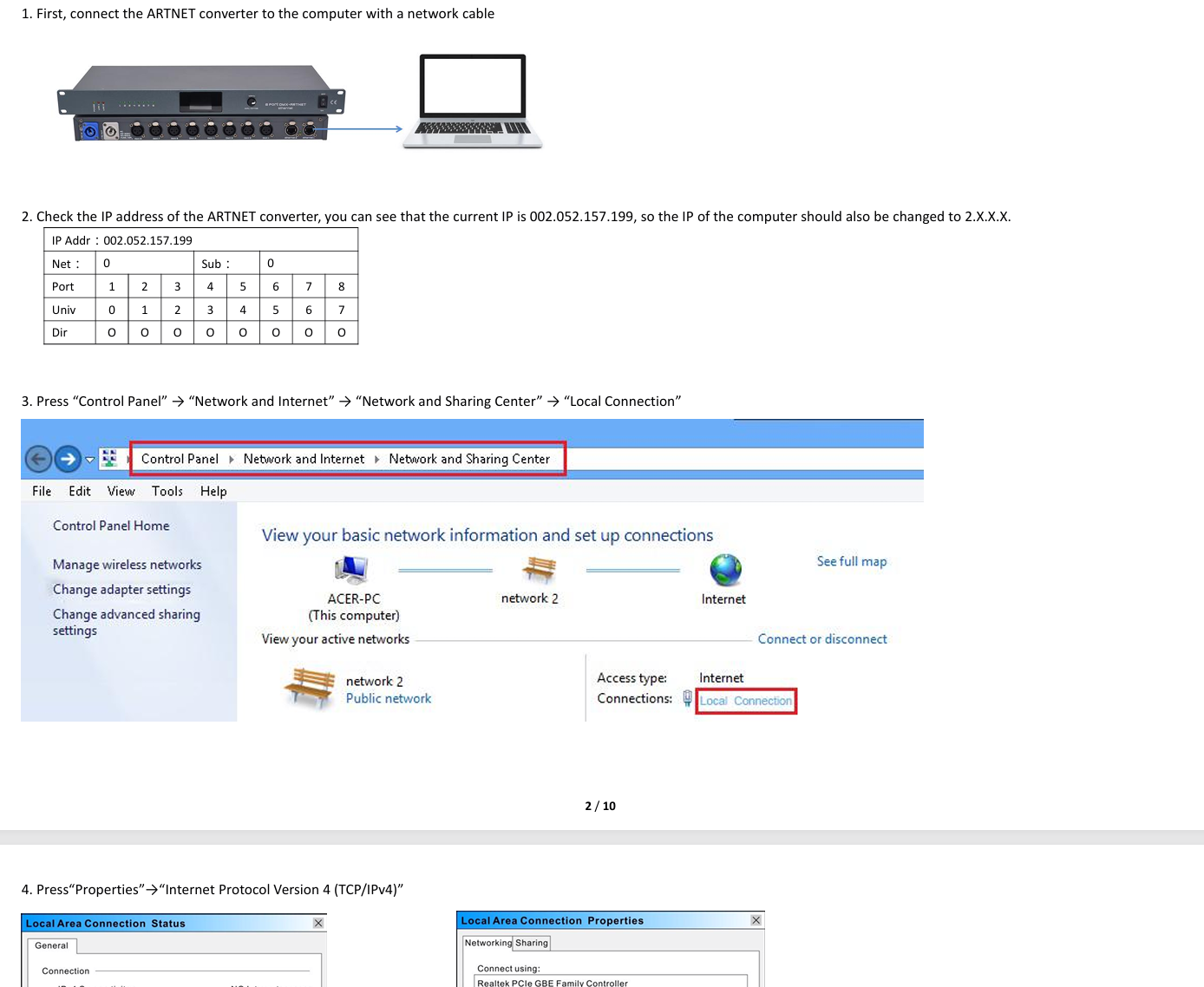
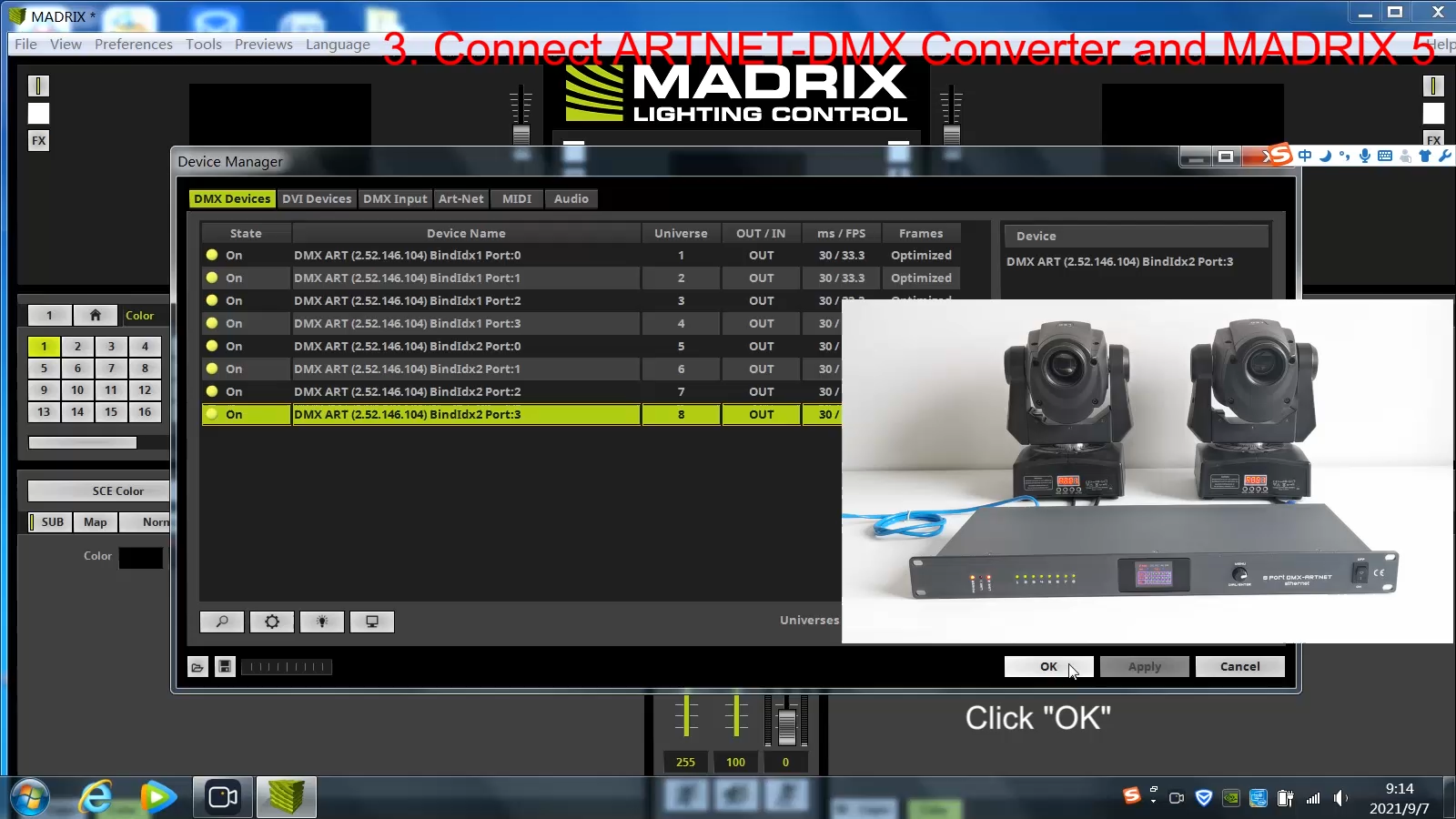
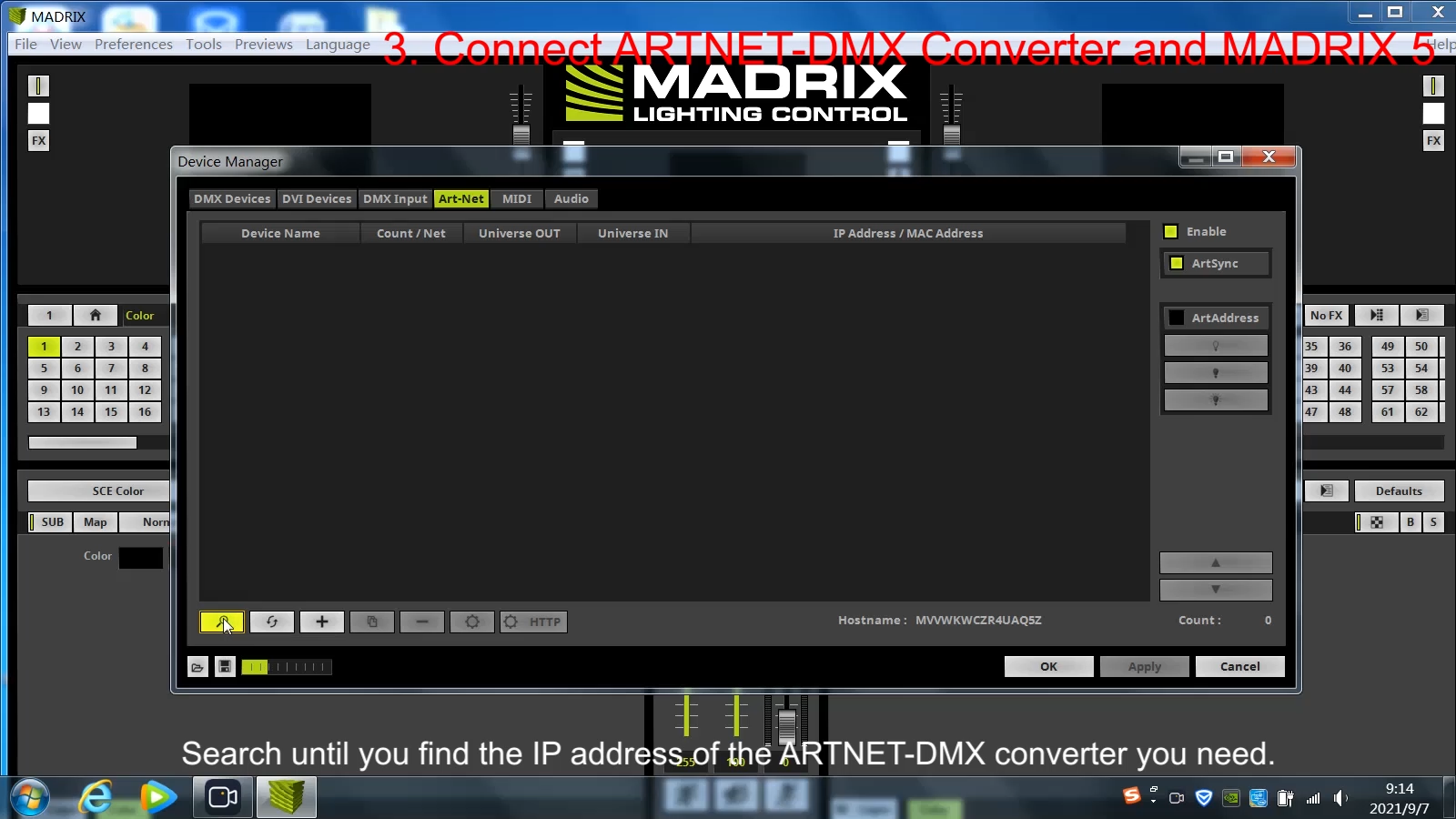
This converter works seamlessly with GrandMA series, Avolites and PC‑based lighting control software. Three IP modes are available both on local menu and web UI.
Three Selectable IP Modes
- 2XX Mode: Optimized for MA‑series lighting consoles, IP range
2.x.x.x, subnet mask fixed255.0.0.0. Factory default for fast out‑of‑box MA integration. Your control PC needs matching subnet for web‑UI login. - 10XX Mode: MA‑ecosystem dedicated mode using
10.x.x.xaddressing scheme with subnet mask255.0.0.0. - Custom IP Mode: For general‑purpose integration. Manually set static IP, subnet mask and gateway, widely used on standard local LAN such as
192.168.1.x.
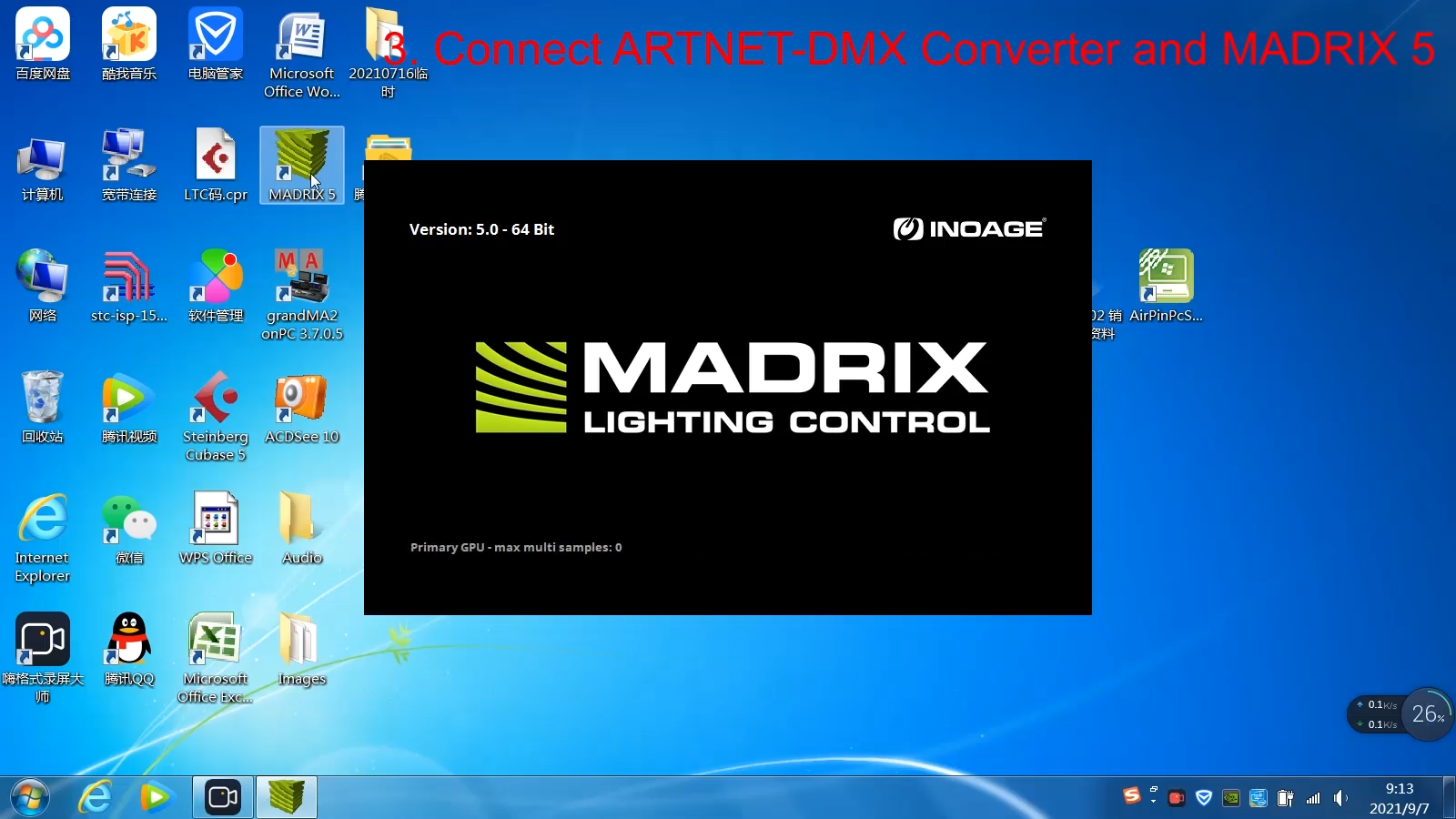
Important note: After switching IP mode, converter IP address will change. You must modify your laptop IPv4 settings and input updated IP in browser to regain web configuration access. Always use static IP for lighting hardware; DHCP is highly discouraged for live‑show environment, dynamic IP reassignment may break patching during performance.
Per‑Port Operation Modes
Each of eight DMX ports can be independently configured:
- Output: Convert incoming ArtNet network packets into physical DMX512 signal to drive lighting fixtures (factory default).
- Input: Capture physical DMX signal from external console or controller and encapsulate data into ArtNet packets and send back to lighting Ethernet network. This is the key bidirectional feature separating premium node from basic one‑way gateway.
- Disable: Shut down unused port completely to eliminate signal noise and simplify TFT‑screen status reading.
Default factory mapping assigns port 1 → universe 0, port 2 → universe 1 … port 8 → universe 7. Technicians can freely remap each port to any universe according project requirements.
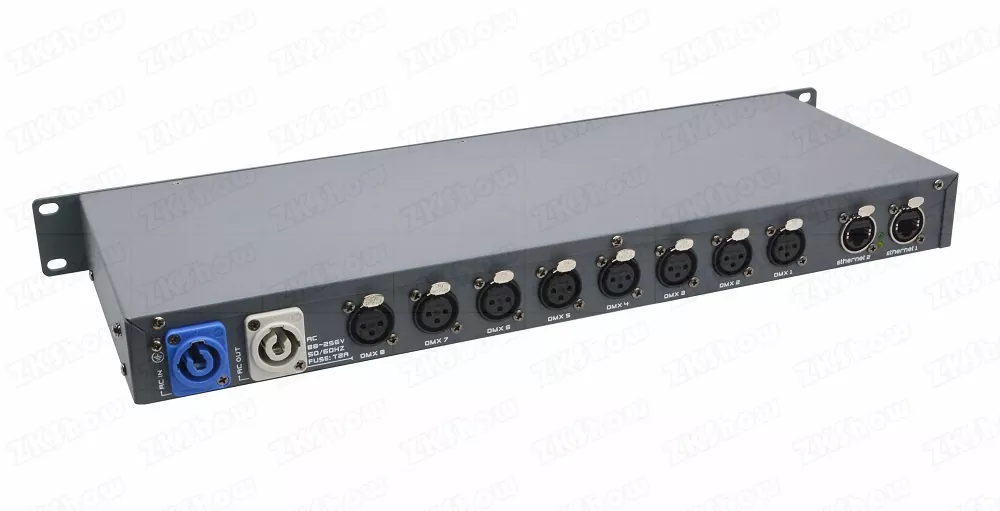
Typical On‑Site Pitfalls & Practical Avoidance Tips
Even high‑quality bidirectional artnet‑8dmx converter may show unexpected behaviour under improper deployment. These are frequent mistakes met on rental and engineering projects.
- PC‑Converter Subnet Mismatch: If converter runs under default 2XX mode, your laptop must set IP inside
2.x.x.xsubnet with255.0.0.0subnet mask. PC staying at192.168.x.xcannot load web‑UI page even when Ethernet link light is on. Always double‑check IP & subnet before web login. - Neglect DMX Timing Adjustment For Legacy Fixtures: Modern fixtures work fine with factory default Break 92 µs / MAB 12 µs. Old dimmers and moving heads may require modified timing value. When you see flicker or unstable fixture response, tune Break (92‑999 µs) and MAB (12‑999 µs) via local rotary knob or web‑UI DMX setting tab.
- Port‑Direction Mis‑configuration: A very common troubleshooting trap: sending ArtNet data to port set as Input mode, or expecting DMX input signal while port is set to Output. Check TFT home‑screen mark (
Ofor Output,Ifor Input,Xfor Disable) before deep fault‑finding. - Share Office LAN For Lighting Multicast Traffic: Never run ArtNet multicast data over venue public Wi‑Fi or general‑purpose office LAN. Multicast packages flood shared network and cause packet loss, lag and lighting drop‑out. Deploy dedicated lighting VLAN or isolated lighting network, use Cat5e or higher‑grade shielded Ethernet cable for all node connections.
- Changed Web Password Without Documentation: Once you modify admin web‑UI password, keep secure records. Lost password requires full factory reset, erasing all custom port‑mapping and network configuration, costing precious show‑preparation time.
Suitable Application Scenarios
- Live Stage & Concert Touring: Compact 1U rack‑mount fits touring flight‑case racks. Bidirectional ports integrate backup console into ArtNet network. Full galvanic isolation reduces ground‑loop risk for multi‑power‑source festival sites.
- Broadcast & Television Studio: Low‑latency stable signal transmission satisfies strict synchronisation requirement for TV recording and camera shooting workflow.
- Corporate Events & Award Ceremonies: Fast re‑configurable port directions adapt different rental‑job console set‑ups, improve equipment turnover rate for rental inventory.
- Nightclub & Permanent Venue Installation: 8‑universe high‑density output consolidates multi‑zone lighting control; dual Ethernet port simplifies structured cabling architecture.
- Theatre & Performing‑Arts Venue: Capture stage‑floor local DMX controller signal as ArtNet input, meanwhile drive multiple fixture zones via DMX outputs from main lighting desk.
Practical Maintenance Advice for Rental & Fixed‑Install Fleets
These simple operations extend device lifespan and reduce field failure rate for your lighting network hardware.
- Pre‑show bench test: Before dispatching for rental jobs, power on converter, verify TFT screen function, test every DMX port both Input and Output mode, confirm LED indicators respond signal traffic.
- Physical protection: Keep unit dry, avoid liquid spill, heavy impact and violent vibration during transit. Store inside flight‑case to protect Neutrik XLR and RJ45 connectors. Do not open or modify hardware enclosure, it voids compliance certification and brings hardware‑damage risk.
- Document configuration files: Record IP scheme, subnet parameters and port‑universe mapping for every project. Save notes so technicians can quickly restore settings after accidental reset.
- Screen‑saver setup: Turn on adjustable‑timeout auto screen‑saver (3‑255 seconds) to prolong TFT display service life for long‑term permanent installation.
- Factory reset before return to rental stock: Use local‑menu or web‑UI factory‑reset function to erase client‑specific custom configuration before next rental deployment.
FAQ
Q: What advantage does bidirectional artnet‑8dmx converter have over 8‑output‑only artnet node?
A: Each physical DMX port can switch into Input mode to convert physical DMX512 signal back into ArtNet network packets. You can integrate legacy DMX gear, backup lighting console and stage‑floor local controllers without purchasing separate external encoder hardware.
Q: Is this converter compatible with GrandMA2 / GrandMA3 lighting consoles?
A: Yes. Built‑in 2XX and 10XX IP modes are specially optimized for MA‑series consoles. Set converter to matching IP mode, adjust console / PC subnet setting, finish universe mapping from local TFT menu or web server.
Q: Why I cannot open web configuration page after switching IP mode?
A: Switching IP mode will change converter IP address. You must adjust your computer IPv4 address and subnet mask to match converter new subnet, input updated IP inside browser address bar.
Q: How many DMX channels can single bidirectional artnet‑8dmx converter process?
A: 8 independent DMX512 universes provide total maximum 4096 channels within 1U rack unit. Multiple network‑chained units can scale up to 32768 universes for huge‑scale festival‑level production.
Q: What should I do if I forget web‑UI administrator login password?
A: Trigger factory reset through front‑panel local MENU rotary encoder. This will restore default web password admin, meanwhile wipe all custom network and port‑mapping parameters. Remember to document passwords on project file to avoid this situation.
B2B Get Your Wholesale & Custom Solution
Are you an event‑rental company, lighting designer or system integrator searching for reliable bidirectional artnet‑8dmx converter for touring, broadcast and fixed venue projects? Contact our B2B sales‑engineering team right now. We support bulk B2B purchase, OEM branding and project‑oriented custom requirements. You can get technical datasheets, configuration documents and pre‑sales technical consultation to check compatibility against your existing lighting console and network infrastructure. Submit your technical requirement, our specialist will reply you within 24 working hours.
#bidirectionalartnet8dmxconverter #artnetdmxnode #stagelightingnetwork #dmx512converter #maconsolestagelight #rentalstageequipment #broadcastlighting #theatrelightingcontrol #8portartnetnode #lightingnetworknode